
Introduction
For Service Support on Microsoft cloud workloads and to raise Incidents to Microsoft for any cloud
or on-premises workloads, SoftwareOne requires that Customer provides SoftwareOne with administrative access. SoftwareOne engineers will resolve incidents and perform service requests directly on a customer Microsoft 365 or Azure cloud tenant. Customers may select what level of administrative access they will permit SoftwareOne.
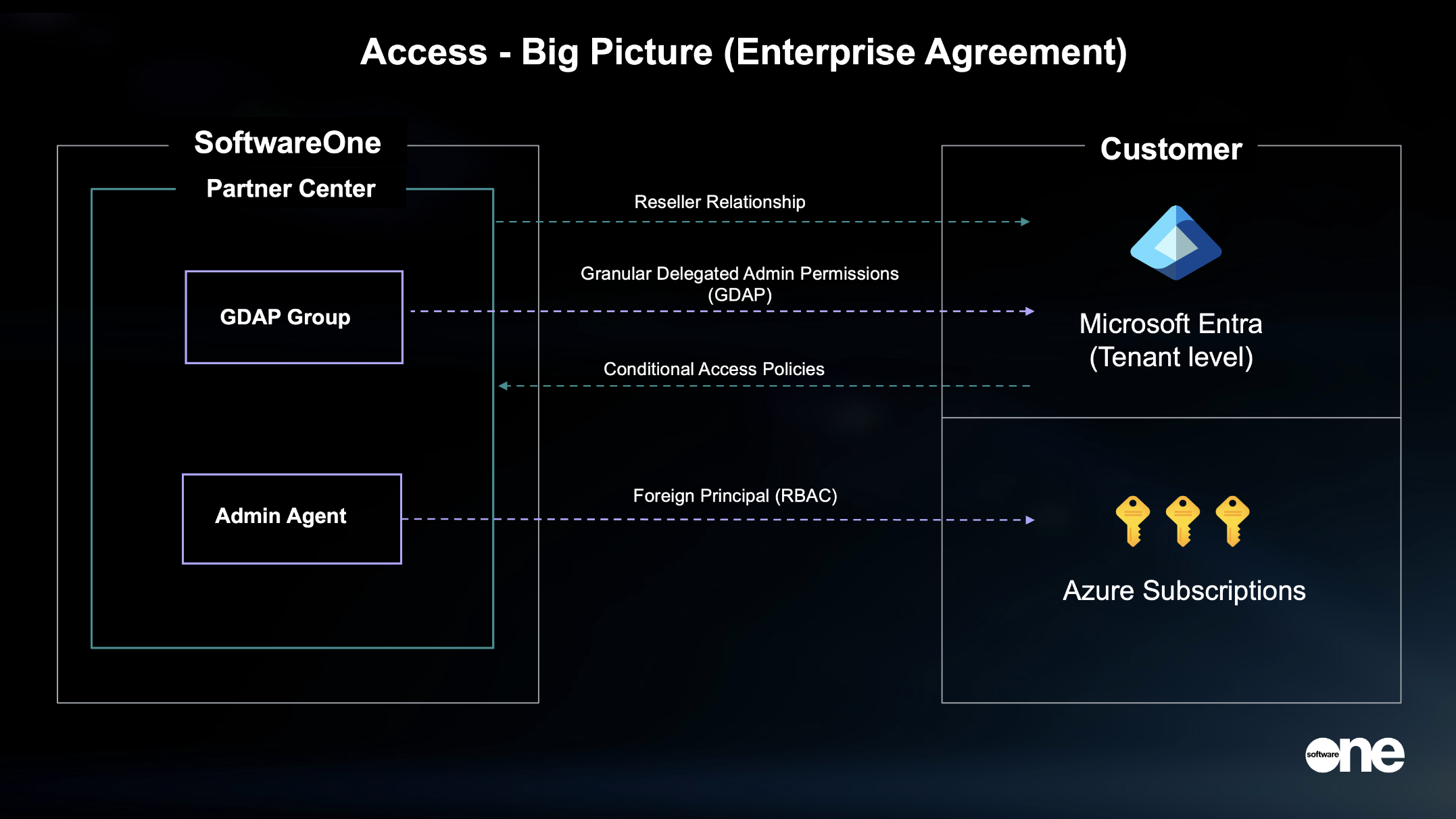
The support that SoftwareOne provides will depend on the level of access provided, and this is explained from a high-level perspective in the diagram below.
Reseller Relationship
Reseller Relationship (tenant level) - A record of a new customer must be added to Partner Center before SoftwareOne can provide support.
During Onboarding, the Onboarding Manager will check the relevant partner center to which the customer’s tenant(s) will be connected and determine if there is a reseller link already established. If there is an existing link then no further action here is required.
If there is no established Reseller Relationship then a link will be generated and sent confirming a Reseller Relationship with SoftwareOne. This is the first link that is required to be accepted and must be accepted by a Global Administrator. This is essential for SoftwareOne to provide the service and to be able to escalate to Microsoft when required.
Reseller Relationship is explained further here.
Granular Delegated Administration Privileges (GDAP)
The standard method for service providers to provide support for Microsoft cloud products is with Microsoft Granular Delegated Administration Privileges (GDAP), an overview if which is published by Microsoft here.
During onboarding SoftwareOne will send up to four (4) GDAPs link to the Customer’s Global Administrator too allow SoftwareOne with the access required to provide the Services. Each link provides a segregated and least-privilege level of access to prevent engineers from having access to a service that they do not support. Separate links are provided to the following
· Microsoft 365
· Azure
· Dynamics 365 and Power Platform
· A dedicated link for the Service Deliver Manager
The initial duration of the GDAP relationship will be mutually agreed between the Customer and SoftwareOne during Onboarding, however the maximum duration allowed by Microsoft is 730 days. The default duration SoftwareOne requests is the longer of the contract term or 730 days. The Customer may terminate the GDAP relationship at any time.
Further details of GDAP options and levels of access can be found here.
CyberArk Identity Security
CyberArk is SoftwareOne’s chosen solution for providing customers with an additional layer of security beyond that provided by Microsoft through GDAP. CyberArk combines secure SSO, Adaptive MFA, Lifecycle Management, Directory Services and User Behavior Analytics, while providing simple and secure access to resources—on-premises, cloud, hybrid— while securing access for any location, using any device.
More information about CyberArk can be found here.
Foreign Principal / Azure RBAC
Partner access is enforced through a dedicated admin agent security group in the partner tenant.
Azure represents this group in the customer environment as a system‑managed Foreign Principal / Foreign Group, which can be assigned Azure RBAC roles at specific scopes (subscription or resource level).
When a partner engineer attempts access, Azure validates their membership in the admin agent group and the RBAC scope assigned to the foreign identity before granting access.
Engineers who are not members of the admin agent group have no visibility or access, and removing group membership immediately revokes permissions.
More information about Foreign Principal can be found here
Conditional Access Policies
For customers that implement Conditional Access Policies, it is critical that appropriate exceptions are considered for SoftwareOne access to provide support.
|
Conditional Access |
Service Impact |
|
Standard Access SoftwareOne granted permanent conditional access to Customer tenants |
|
|
Limited Access SoftwareOne granted conditional access on demand in response to an incident |
|
|
Restricted Access No Conditional Access permitted |
|